I recently moved my flat-panel displays further away from my computer, but the DVI cables they came with weren’t long enough to connect the displays to the computer in their new location. So, I ordered some longer DVI cables from Newegg.com.
Turns out that both of my displays’ ports are DVI-D and that the cables were DVI-I. Well, DVI-I cables have four extra pins that carry analog signal in case you want to use it to hook up an analog display with an analog video adapter. And you can’t stick a 29-pin DVI-I cable into a 25-hole DVI-D port (but you can put a 25-pin DVI-D cable into a 29-pin DVI-I port)!
Yes, it was my bad for not looking at the display ports before buying these cables. I didn’t think to — all of the video cards I’ve used have DVI-I ports.
It sucks that displays have a DVI-D ports
It would be nice if digital displays and video cards only had DVI-I ports and never DVI-D ports — just have those 4 extra holes (and a wider analog ground pin hole) not do anything. I understand that it could possibly cause confusion (“Why is analog not working with my display over my DVI-I cable?”), but I think that’s much less likely and less significant than not being able to put a DVI-I cable to use with the display (don’t just take my word for it).
But really…
It should be very difficult to buy DVI-I cables
Really — why the heck would you want to use a DVI cable for an analog signal? I’ve hooked up a dozen analog displays to DVI video cards, and to do that it always involved a VGA cable (because any display I’ve ever seen that supports analog does so with a VGA cable or VGA port) and a DVI-I -to- VGA adapter at the video card.
I had three options…
… before me as stood there holding DVI-I cables in front of my DVI-D displays (well, technically I was behind them).
- Exchange the DVI-I cables for DVI-D cables. Would have taken several days and cost return shipping.
- Buy DVI-I (female) -to- DVI-D (male) adapters. Would have taken several days and cost as much as the cables themselves.
- “Convert” my DVI-I cables to DVI-D cables.
I chose #3, which involved using needle-nose pliers to break off the four analog pins (twisting each back-and-forth until they break, then bending the remaining stubs down) and using wire cutters to cut off the sides of the big flat analog ground (pin C5 is wider in DVI-I than it is in DVI-D).
Rosewill and Newegg, shame on you for making DVI-I cables so easy to buy.
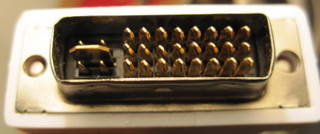
male DVI-I connector before analogcision
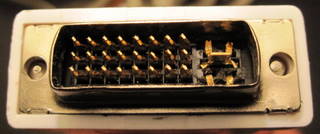
male DVI-I connector after being converted to a DVI-D cable
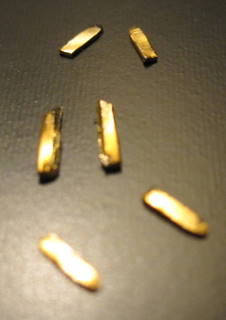
DVI-I -to- DVI-D conversion shrapnel
Well, I just did the same thing…bought a longer DVI-I cable. My computer has the DVI-I plug…my new monitor has the DVI-D plug. I too just ordered the cable online and don’t want to go through the hassle of returning it. I’m doing your junk-yard fix.
Thanks.
well it looks like ill be doing this tonight. believe it or not this is proly less of a hassle than exchanging it. and a lot quicker. glad to see someone else got it to work, makes me feel better about ripping this thing apart.
Ended up doing this with a KVM switch i bought at a local store, what a pain.
Looks like a need to get out the pliers. Cheap DVI I cables, who knew.
Thanks. I did same mistake and thought for same solution but surfed net to check if it will work.
THANK YOU for this explanation!! Great rig also!
Which tools did you use, and how did you open the adapter? (if you opened it)
Thank you.
I didn’t even know this was a thing. You’re right, displays and cards should just support both. Now, where are the pliers?
Thanks!!!
Thanks for sharing! Was thinking about doing this but didn’t know how bad this could turn out.
Thanks for posting this. I found myself in the same situation without having bothered to check on the different cable end pins. I assumed a DVI cable was a DVI cable. In my case I removed the 4 smaller pins easily by prying them off completely with a narrow end pliers. I could not find a small enough wire cutter to shave off the middle wide analog ground pin and figured I could pull it out and return it if need be. So I pulled it out and shaved off the sides and pushed the shaved ground pin back in with the idea that it may help stabilize the fit to the monitor female DVI terminal. All good and working.
Man, It took me like 30 min to get this done and the screen works perfectly. Really thank you for leaving such simple but helpfull post. Anyone with doubts if this would work it works, even with high speed monster cables.
hell yea, i made the same mistake who’d ever turn there monitor upsidedown, you rock man! stay classy
Thanks man! I did the same and really worked!
I tried this to convert a DVI-I to DVI-D on a DVI to VGA adapter and it didn’t work out!
Same problem here for HDMI to DVI adapter. Bought DVI-I version monitor is DVD-D. Let’s cut off all four little pins carrying the analogue signal and the big one too because who needs it. There are screws on the side for a good mechanical connection anyway.
> Max says:
> June 30, 2015 at 1:08 pm
> I tried this to convert a DVI-I to DVI-D on a DVI to VGA adapter and it didn’t work out!
Aww yeah that was already in the original post. The pins you removed carry the actual VGA signal. So, if the DVD-I adapter did not fit in your computer in the first place the computer does not carry a VGA signal on that DVI output. If the VGA is on your computer side you need to connect it with a VGA-to-VGA cable on the monitor. I have never seen an analoge DVI-I connector on a monitor only a DVI-D combined with a true VGA (blue most of the time). So for analogue VGA monitors only this works:
PC VGA -> Monitor VGA
PC DVI-I -> DVI-I to VGA -> Monitor VGA
Can it work for DVI-VGA adapter? i have a DVI-A and i want to use dual monitor, so my primary monitor is using the DVI-I port and the one left is the DVI-D, as VGA is an analog display standard, would it work if the analog pins are removed?
The DVI to DVI in addition to Analogue Adapter permits you to extract both analogue movie and/or a digital DVI-D movie coming from a individual movie origin (typically your working computer movie card). Just put inside DVI-I connector out of your movie origin to the insight aspect from the cable connection. Visit Dueltek.com.au to learn more.
Why oh why would anyone have an analog signal coming from an HDMI? seems like their would be no need for these extra pins ever for HDMI and DVI cables. They would be necessary for DVI/VGA cables though.
Not able to cut the wider part . pls help
Thanks, worked for me. Snipped the 4 pins around the blade and trimmed the blade with a Dremel cutting tool.
Ha ha, I’m such an idiot. I snipped the four extra pins on my little DVI–I to VGA adapter, before reading all the replies to this post. Well, I can confirm it renders the adapter useless. I never realized those 4 extra pins are what carried the VGA analog signal that is used by the adapter to “convert”. Oh well.
Are you sure that is the correct “after” picture? Shouldn’t there only be the C5 pin left? I see the four outer pins remaining and it’s driving me crazy trying to figure out if it is suppose to be the way that the picture shows. I’m thinking not.
In the “after” picture, the four outer pins (C1-C4) are cut, but I wasn’t able to cut them all the way. What remained are bent down, out of the way.